Rabu, 19 April 2017

Topic:2 Lecture 4. internet

give the difference between a MAC and an IP address.

explain each section of the IP address header.-

list the different IP address classes with its corresponding detail.

identify the IP version 4 public addresses and IP version 4 private addresses.-

identify the difference between IP version 4 and IP version 6 address.

give the differences between TCP and UDP.

explain what us a subnet and subnet addressing.

explain VLSM and identify its purpose.


An Ip address or Internet Protocol adress is the address assigned to your mobile,printer or computer by the network that uses Internet protocol for communication . Your IP can change with the change in network.IP addresses are divided into classes . A,B,C,D,E mostly we use class B and D 

Mac address is your machine address . This address will never change . It is the unique machine address given to your device . Your device will have communication with the local area network or any network using this address . Once you use the network your mac adress is tored in the network table so that network does not have to search your mac address again and again and shortest path towards it will be stored in routing table .

reference: https://www.quora.com/What-is-the-difference-between-an-IP-address-Mac-address-and-gateway-address
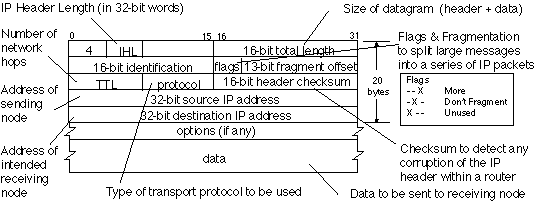


  • Version (always set to the value 4 in the current version of IP)
  • IP Header Length (number of 32 -bit words forming the header, usually five)
  • Type of Service (ToS), now known as Differentiated Services Code Point (DSCP) (usually set to 0, but may indicate particular Quality of Service needs from the network, the DSCP defines the way routers should queue packets while they are waiting to be forwarded).
  • Size of Datagram (in bytes, this is the combined length of the header and the data)
  • Identification ( 16-bit number which together with the source address uniquely identifies this packet - used during reassembly of fragmented datagrams)
  • Flags (a sequence of three flags (one of the 4 bits is unused) used to control whether routers are allowed to fragment a packet (i.e. the Don't Fragment, DF, flag), and to indicate the parts of a packet to the receiver)
  • Fragmentation Offset (a byte count from the start of the original sent packet, set by any router which performs IP router fragmentation)
  • Time To Live (Number of hops /links which the packet may be routed over, decremented by most routers - used to prevent accidental routing loops)
  • Protocol (Service Access Point (SAP) which indicates the type of transport packet being carried (e.g. 1 = ICMP; 2= IGMP; 6 = TCP; 17= UDP).
  • Header Checksum (A 1's complement checksum inserted by the sender and updated whenever the packet header is modified by a router - Used to detect processing errors introduced into the packet inside a routeror bridge where the packet is not protected by a link layer cyclic redundancy check. Packets with an invalid checksum are discarded by all nodes in an IP network)
  • Source Address (the IP address of the original sender of the packet)
  • Destination Address (the IP address of the final destination of the packet)
  • Options (not normally used, but, when used, the IP header length will be greater than five 32-bit words to indicate the size of the options field)

reference:  Erg.abdn.ac.uk. (2017). Iv4P Packet Header. [online] Available at: http://www.erg.abdn.ac.uk/users/gorry/course/inet-pages/ip-packet.html [Accessed 20 Apr. 2017].


ClassStart addressFinish address
A0.0.0.0126.255.255.255
B128.0.0.0191.255.255.255
C192.0.0.0223.255.255.255
D224.0.0.0239.255.255.255
E240.0.0.0255.255.255.255

reference: Abrams, L., Abrams, L., Abrams, L., Abrams, L., Abrams, L. and Abrams, L. (2017). IP Addresses Explained. [online] BleepingComputer. Available at: https://www.bleepingcomputer.com/tutorials/ip-addresses-explained/ [Accessed 20 Apr. 2017].


IPv4 (Internet Protocol Version 4) is the fourth revision of the Internet Protocol (IP) used to to identify devices on a network through an addressing system. The Internet Protocol is designed for use in interconnected systems of packet-switched computer communication networks  IPv4 uses a 32-bit address scheme allowing for a total of 2^32 addresses (just over 4 billion addresses).

IPv6 (Internet Protocol Version 6) is also called IPng (Internet Protocol next generation) and it is the newest version of the Internet Protocol (IP) reviewed in the IETF standards committees to replace the current version of IPv4 (Internet Protocol Version 4). IPv6 addresses are 128-bit IP address written in hexadecimal and separated by colons.

reference: Webopedia.com. (2017). What is The Difference Between IPv6 and IPv4? - Webopedia.com. [online] Available at: http://www.webopedia.com/DidYouKnow/Internet/ipv6_ipv4_difference.html [Accessed 20 Apr. 2017].


                                   TCP                   UDP
Acronym forTransmission Control ProtocolUser Datagram Protocol or Universal Datagram Protocol
ConnectionTCP is a connection-oriented protocol.UDP is a connectionless protocol.
FunctionAs a message makes its way across the internet from one computer to another. This is connection based.UDP is also a protocol used in message transport or transfer. This is not connection based which means that one program can send a load of packets to another and that would be the end of the relationship.
UsageTCP is suited for applications that require high reliability, and transmission time is relatively less critical.UDP is suitable for applications that need fast, efficient transmission, such as games. UDP's stateless nature is also useful for servers that answer small queries from huge numbers of clients.
Use by other protocolsHTTP, HTTPs, FTP, SMTP, TelnetDNS, DHCP, TFTP, SNMP, RIP, VOIP.
Ordering of data packetsTCP rearranges data packets in the order specified.UDP has no inherent order as all packets are independent of each other. If ordering is required, it has to be managed by the application layer.
Speed of transferThe speed for TCP is slower than UDP.UDP is faster because error recovery is not attempted. It is a "best effort" protocol.
ReliabilityThere is absolute guarantee that the data transferred remains intact and arrives in the same order in which it was sent.There is no guarantee that the messages or packets sent would reach at all.
Header SizeTCP header size is 20 bytesUDP Header size is 8 bytes.
Common Header FieldsSource port, Destination port, Check SumSource port, Destination port, Check Sum
Streaming of dataData is read as a byte stream, no distinguishing indications are transmitted to signal message (segment) boundaries.Packets are sent individually and are checked for integrity only if they arrive. Packets have definite boundaries which are honored upon receipt, meaning a read operation at the receiver socket will yield an entire message as it was originally sent.
WeightTCP is heavy-weight. TCP requires three packets to set up a socket connection, before any user data can be sent. TCP handles reliability and congestion control.UDP is lightweight. There is no ordering of messages, no tracking connections, etc. It is a small transport layer designed on top of IP.
Data Flow ControlTCP does Flow Control. TCP requires three packets to set up a socket connection, before any user data can be sent. TCP handles reliability and congestion control.UDP does not have an option for flow control
Error CheckingTCP does error checking and error recovery. Erroneous packets are retransmitted from the source to the destination.UDP does error checking but simply discards erroneous packets. Error recovery is not attempted.

reference: Diffen.com. (2017). TCP vs UDP - Difference and Comparison | Diffen. [online] Available at: http://www.diffen.com/difference/TCP_vs_UDP [Accessed 20 Apr. 2017].


A subnet (short for "subnetwork") is an identifiably separate part of an organization's network. Typically, a subnet may represent all the machines at one geographic location, in one building, or on the same local area network (LAN). Having an organization's network divided into subnets allows it to be connected to the Internet with a single shared network address. Without subnets, an organization could get multiple connections to the Internet, one for each of its physically separate subnetworks, 

Subnet addressing allows us to split one IP network address into smaller multiple physical networks known as subnetworks. Some of the node numbers are used as a subnet number instead. A Class B address gives us 16 bits of node numbers translating to 64,000 nodes. Most organizations do not use 64,000 nodes, so there are free bits that can be reassigned. Subnet addressing makes use of those bits that are free,

reference: Documentation.netgear.com. (2017). Subnet Addressing. [online] Available at: http://documentation.netgear.com/reference/nld/tcpip/TCPIPBasics-3-08.html [Accessed 20 Apr. 2017].


Variable Length Subnet Mask, abbreviated as VLSM, is a means to specify a different subnet mask for the same network number on different subnets. With VLSM, a network administrator can use a long mask on networks with few hosts and a short mask on subnets with many hosts. To use VLSM, the routing protocol must support it.

reference:  Webopedia.com. (2017). What is variable length subnet mask? Webopedia Definition. [online] Available at: http://www.webopedia.com/TERM/V/variable_length_subnet_mask.html [Accessed 20 Apr. 2017].

Isnin, 17 April 2017

Topic 2 : OSI MODEL PROTOCOL

The Application Layer
consists of protocols that focus on process-to-process communication across an IP network and provides a firm communication interface and end-user services.

  • DHCP -  client/server protocol that automatically provides an Internet Protocol (IP) host with its IP address and other related configuration information such as the subnet mask and default gateway.
  • FTP - the Internet's TCP/IP protocols to enable data transfer. 
  • SMTP - used when email is delivered from an email client, such as Outlook Express, to an email server or when email is delivered from one email server to another.
  • POP3 -  client/server protocol in which e-mail is received and held for you by your Internet server.
  • IMAP - used by e-mail clients to retrieve e-mail messages from a mail server over a TCP/IP connection
  • HTTP - defines how messages are formatted and transmitted, and what actions Web servers and browsers should take in response to various commands.
reference: Techopedia.com. (2017). What is the Application Layer? - Definition from Techopedia. [online] Available at: https://www.techopedia.com/definition/6006/application-layer [Accessed 18 Apr. 2017].


Presesntation Layer
used to present data to the application layer (layer 7) in an accurate, well-defined and standardized format. 

  • AFP -  AppleTalk Filing Protocol, the client/server file sharing protocol used in an AppleTalk network.
  • SMB - Server Message Block, a message format used by DOS and Windows to share files, directories and devices.
  • NCP -  NetWare Core Protocol is the file-sharing protocol between server and client(
  • SSL - 
  • MIME - 
reference: Techopedia.com. (2017). What is the Presentation Layer? - Definition from Techopedia. [online] Available at: https://www.techopedia.com/definition/8955/presentation-layer [Accessed 18 Apr. 2017].


The Session Layer
controls the connections between multiple computers.

ASP
NETBIOS

reference: Techopedia.com. (2017). What is the Session Layer? - Definition from Techopedia. [online] Available at: https://www.techopedia.com/definition/9322/session-layer [Accessed 18 Apr. 2017].


The Transport Layer
provides logical communication between application processes running on different hosts within a layered architecture of protocols and other network components.

TCP
UDP
NETBEUI
SPX
ATP

reference: Techopedia.com. (2017). What is the Transport Layer? - Definition from Techopedia. [online] Available at: https://www.techopedia.com/definition/9760/transport-layer [Accessed 18 Apr. 2017].

The Network Layer
data routing paths for network communication.

Netware IPX/SPX -  Internetwork Packet Exchange/Sequenced Packet Exchange
Internet Protocol - a set of rules governing the format of data sent over the Internet or other network

IP
OSPF
BGP
NETBEUI
DDP

reference: Techopedia.com. (2017). What is the Network Layer? - Definition from Techopedia. [online] Available at: https://www.techopedia.com/definition/24204/network-layer [Accessed 18 Apr. 2017].


Data link layer
 used for the encoding, decoding and logical organization of data bits. Data packets are framed and addressed by this layer, which has two sublayers.

media access control (MAC): allows the data link layer to provide the best data transmission vehicle and manage data flow control.
logical link control: manages error checking and data flow over a network.

ETHERNET
TOKEN RING
FDDI
IEEE 802.11
ATM

PPP - provide a standard way to transport multiprotocol data over point-to-point links. 

HDLC - rules for transmitting data between network points (sometimes called nodes).

reference: Techopedia.com. (2017). What is Data Link Layer? - Definition from Techopedia. [online] Available at: https://www.techopedia.com/definition/18698/data-link-layer [Accessed 18 Apr. 2017].


Selasa, 11 April 2017

Topic 2 - IEEE 802 & RS232/RS422


1) research the IEEE 802 working groups. list each group with abrief description and state whether it is active or not.

2) research the following standards and for each standard, briefly describe the devices to which it relates.
           -RS232
           -RS422


answer


1)
ACTIVE WORKING

802.1 High Level Interface (HILI)
802.3 CSMA/CD Working
802.11 Wireless LAN (WLAN)
802.15 Wireless Personal Area Network (WPAN)
802.16 Broadband Wireless Access (BBWA)
802.17 Resilient Packet Ring (RPR)
802.18 Radio Regulatory Technical Advisory
802.19 Coexistence Technical Advisory
802.20 Mobile Wireless Access
802.21 Media Independent Handover


HIBERNATING WORKING GROUPS

802.2 Logical Link Control (LLC)
802.5 Token Ring
802.12 Demand Priority


DISBANDED WORKING GROUPS

802.4 Token Bus
802.6 Metropolitan Area Network (MAN)
802.7 BroadBand Technical Adv. Group (BBTAG)
802.8 Fiber Optics Technical Adv. Group (FOTAG)
802.9 Integrated Services LAN (ISLAN)
802.10 Standard for Interoperable LAN Security (SILS)
802.14 Cable-TV Based Broadband Communication Network

reference :  Grouper.ieee.org. (2017). [online] Available at: http://grouper.ieee.org/groups/802/802%20overview.pdf [Accessed 12 Apr. 2017].


2)

RS-232 (ANSI/EIA-232 Standard) is the serial connection historically found on IBM-compatible PCs. It is used for many purposes, such as connecting a mouse, printer, or modem, as well as industrial instrumentation. Because of improvements in line drivers and cables, applications often increase the performance of RS-232 beyond the distance and speed listed in the standard. RS-232 is limited to point-to-point connections between PC serial ports and devices. RS-232 hardware can be used for serial communication up to distances of 50 feet.


Data
TXD (pin 3)Serial Data Output
RXD (pin 2)Serial Data Input
Handshake
RTS (pin 7)Request to Send
CTS (pin 8)Clear to Send
DSR (pin 6)Data Set Ready
DCD (pin 1)Data Carrier Detect
DTR (pin 4)Data Terminal Ready
Ground
GND (pin 5)Ground
Other
RI (pin 9)Ring Indicator

Table 1: Pin Functions for RS-232


RS-422 (EIA RS-422-A Standard) is the serial connection historically used on Apple Macintosh computers. RS-422 uses a differential electrical signal, as opposed to unbalanced signals referenced to ground with the RS-232. Differential transmission uses two lines each for transmit and receive signals which results in greater noise immunity and longer distances as compared to the RS-232. These advantages make RS-422 a better fit for industrial applications.


Data
TXD+ (pin 8)Serial Data Output (differential)
TXD- (pin 9)Serial Data Output(differential)
RXD+ (pin 4)Serial Data Input(differential)
RXD- (pin 5)Serial Data Input(differential)
Handshake
RTS+ (pin 3)Request to Send (differential)
RTS- (pin 7)Request to Send (differential)
CTS+ (pin 2)Clear to Send (differential)
CTS- (pin 6)Clear to Send (differential)
DSR (pin 6)Data Set Ready
Ground
GND (pin 1)Ground

Table 2: Pin Functions for RS-485 and RS-422


reference:

RS-232, RS-422, RS-485 Serial Communication General Concepts - National Instruments

Ni.com. (2017). RS-232, RS-422, RS-485 Serial Communication General Concepts - National Instruments. [online] Available at: http://www.ni.com/white-paper/11390/en/ [Accessed 12 Apr. 2017].

Isnin, 10 April 2017

Topic 2 - Protocol


HTTP - hypertext transfer protocoldefines how messages are formatted and transmitted, and what actions Web servers and browsers should take in response to various commands.


FTP - file transfer protocol network protocol used for the transfer of computer files from a server to a client using the Client–server model on a computer network.


IP - internet protocol - a set of rules governing the format of data sent over the internet or other network.


TCP - transmission control protocol - basic communication language or protocol of the internet


POP3 - post office protocol used by your computer to access e-mail messages from a remote server


SMTP - simple mail transfer protocol  a protocol for sending e-mail messages between servers.


IMAP - internet message access protocol  used by e-mail clients to retrieve e-mail messages from a mail server over a TCP/IP connection.

Ahad, 9 April 2017

Lecture 4

briefly describe five main issues that must be addressed when designing computer network.

briefly explain why networks are modeled as a stack of layers.

briefly describe the role of an interface when modeling a network as a stack layers.

explain the role played by a session in a network connection.

state the seven layers of the OSI reference model in the correct order and briefly state the purpose of each layer.


the five main issues that must be addressed when designing computer network are addressing , error control, flow control, multiplexing and routing. addressing is to send the message to the specific address. error control is to make sure that the message is received. flow control is to match the speed of the sender with the receiver. mutiplexing is dividing the message into several part to make sure that every receiver receive the message at the same time. routing is selecting the best part to send the message to the receiver.


the process must be done in order of the hierarchy. the process must be done each step and each step cannot be skipped.

the purpose of interface when modeling a network as a stack layers is the application and the user interact directly with the application software. tis layer interact with software applications that implement a communicating component.


session  is controls the dialogues (connections) between computers. it establishes, manages and terminates the connections between the local and remote applications.

application leyer
presentation layer
session layer
transport layer
network layer
data link layer
physical layer


Rabu, 5 April 2017

Computer Networks - Topic 1 Activity
·        Explain the OSI Model.
·        Identify and explain the 7 layers of the OSI Model.
-         Description
-         Purpose
-         Protocols


The Open Systems Interconnection model (OSI model) is a conceptual model that characterizes and standardizes the communication functions of a telecommunication or computing system without regard to their underlying internal structure and technology. Its goal is the interoperability of diverse communication systems with standard protocols. The model partitions a communication system into abstraction layers. The original version of the model defined seven layers.
Layer 1:  Physical Layer
Layer 2: Data link layer
Layer 3 : network layer
Layer 4: transport layer
Layer 5; Session layer
Layer 6: Presentation layer
Layer 7: Application layer


Layer 1:  Physical Layer

Physical layer is the electrical and physical specification of data connection. it define the relationship between a device and a physical transmission medium such as copper or a fiber optical cable. it is responsible for a transmission and reception of unstructured raw data in a physical medium.

Layer 2: Data link layer

the data link layer is a link between two directly connected nodes. it detect and possibly correct errors that may occur in the physical layer. it define the protocol to establish and terminate a connection between who physically connected device. the data link layer is divided into two sub layer which is Media access control (MAC) and Logical link control (LLC).

Media access control is responsible for controlling how a device in a network gain to a medium and permission to transmit data.

Logical link control (LLC) is responsible for identifying network layer protocols and then encapsulating them and controls error checking and frame synchronization.


Layer 3 : network layer

Network layer provides the functional and procedural means of transferring variable length data sequences called datagrams from one node to another connected to the same "network". 


Layer 4: transport layer

the transport layer provide the functional and procedural means of transferring varaible-length data sequences to a destination host via one or more networks, while maintaining the quality of service function.

an example of a transport-layer protocol in the standard internet stack is Transmission Control Protocol (TCP), usually built on top of the internet protocol (IP).

The transfer layer control the reliability of a given link through flow control, segmentation/desegmentation and error control.


Layer 5; Session layer

the session layer controls the dialogues (connections) between computers. it establishes, manages and terminates the connections between the local and remote application. The OSI model made this layer responsible for graceful close of session, which is a property of the TCP and also for session check pointing and recovery.


Layer 6: Presentation layer

Presentation layer establishes context between application-layer entities, in which the application-layer entities may use different syntax and semantics if the presentation service provides a mapping between them.

this layer provides independence from data representation for example encryption, by translating between application and network formats. this layer formats and encrypts data into the form that the application accepts.


Layer 7: Application layer

the application layer is the OSI layer closest to the end user, which means both the OSI application and the user interact directly with the software application. This layer interact with software applications that implement a communicating component.

application-layer functions typically include identifying communication partner, determining resources availability communication partners, and synchronizing communication. when identifying communication partners, the applications layer determine the identity and availability of communication partners for an application with data to transmit. when determining resource availability, the application layer must decide whether sufficient network resources for the requested communication are available.


explain wireless network and wifi, identify the advantages of wireless network. list all of the wireless devices in your home and college....